Built On Windows Packet Monitor
WireTuna uses the native Windows Packet Monitor capture path so the first-party capture stack stays at the center of the app.
WireTuna is a Windows-first packet analyzer built on Packet Monitor. It maps live traffic to apps, destinations, protocols, bandwidth, and plain-English meaning before you dive into packet bytes, filters, or OSI layer details.
Native capture path
Built around Windows Packet Monitor.
Live traffic context
App, endpoint, protocol, and bandwidth in one view.
Packet-level depth
Open raw bytes, translated fields, and IP ownership when needed.
Pick an adapter, start Packet Monitor capture, inspect a live conversation, then open packet data, ownership lookup, or network tools in their own windows.
WireTuna launch flow
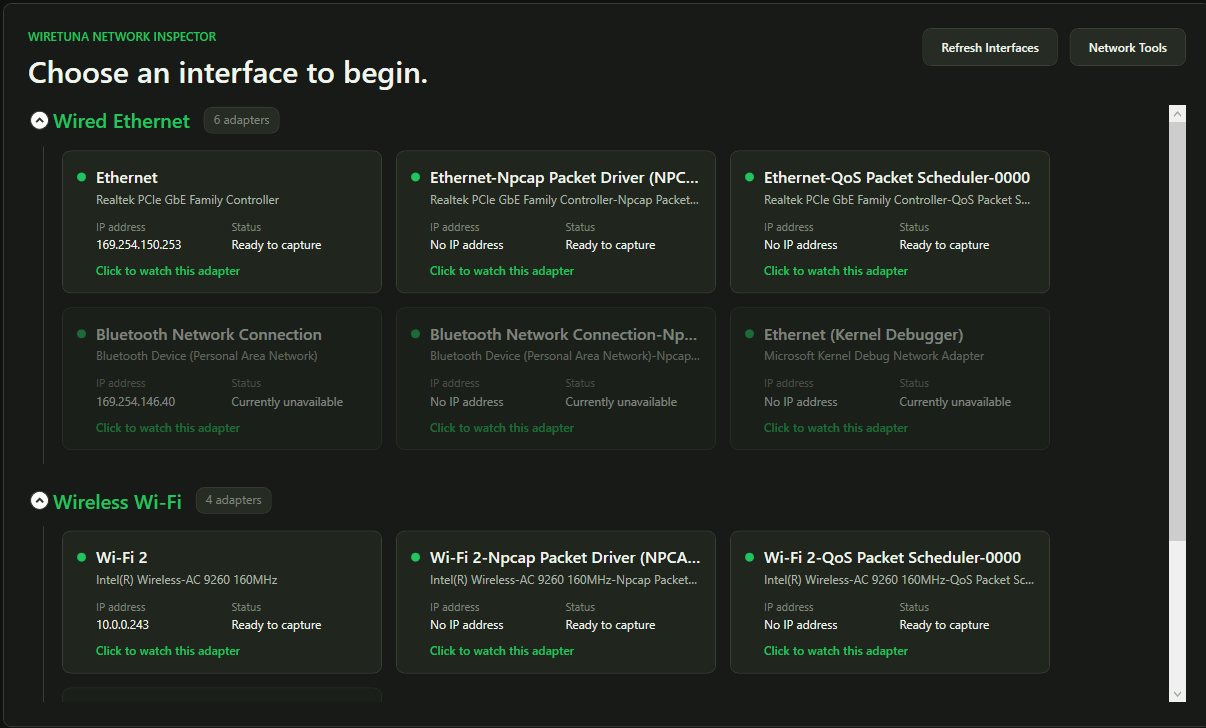
Click the Wi-Fi 2 adapter card to open the live dashboard.
Master the OSI model by seeing it in action.
Debug connectivity and API calls without the clutter.
Keep a pulse on your smart home or server traffic.
Finally see what your devices are saying behind your back.
WireTuna keeps the technical signal intact while making the first answer obvious for students, developers, home labbers, and anyone trying to understand an unknown connection.
WireTuna uses the native Windows Packet Monitor capture path so the first-party capture stack stays at the center of the app.
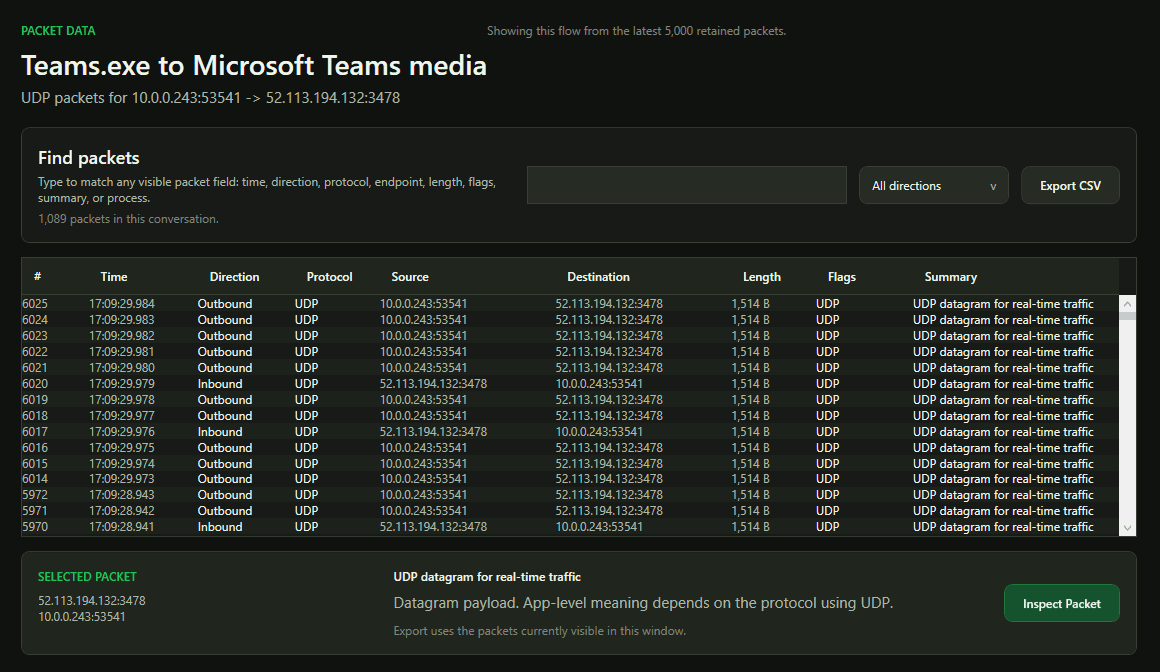
Open translated packet fields or raw bytes without losing the app, destination, and protocol context that got you there.
The dashboard groups traffic by app, destination, protocol, meaning, and bandwidth so the first read is faster than a wall of packets.
Students, home labs, developers, and troubleshooters can learn packet capture by following the conversation instead of memorizing filters first.
A bounded real-time traffic pipeline and capped packet history keep the UI readable while live traffic continues to move.
Start with the answer you actually need: which app is talking, where it is going, and whether the traffic deserves attention.
Click any screenshot to open the full-resolution view with the real WireTuna UI details intact, from adapter selection through packet inspection.
Full-screen gallery, original PNG clarity.
WireTuna starts with real adapter selection, grouped by wired, wireless, and system interfaces.
The main screen focuses on apps, destinations, plain-English meaning, risk context, and live bandwidth.
Filter, direction, packet rows, CSV export, and selected packet context.
Layered packet data with byte-level translation for learning and verification.
Inspect retained raw bytes without losing the readable layer explanation.
Resolve unknown IP context without turning ownership into a malware verdict.
Ping monitor and route tracing for latency, packet loss, and path questions.
Windows packet analyzers, Packet Monitor, app-based bandwidth checks, OSI layers, ports, and beginner-friendly troubleshooting now have their own crawlable pages.
Windows packet analyzer
Learn how to read Windows packet capture around apps, destinations, protocols, ports, bandwidth, and ownership context instead of starting with raw packet rows.
Read guidePacket capture basics
A beginner-friendly packet capture guide for understanding packets, ports, protocols, destinations, TLS, and the OSI model through real Windows traffic.
Read guideBeginner-friendly packet analysis
Compare WireTuna's beginner-friendly Windows network inspector workflow with traditional packet analysis tools such as Wireshark.
Read guidePacket Monitor on Windows
Need a GUI for Windows Packet Monitor? Learn how WireTuna turns Packet Monitor capture into app-first network visibility, packet inspection, and bandwidth troubleshooting.
Read guideBandwidth by app
Track which app is using bandwidth on Windows by tying traffic to processes, destinations, protocols, and timing instead of watching a single Mbps number.
Read guideReference links
Clean outbound links to authoritative packet capture, display filter, and port registry references.
WireTuna is free to download and use. Get live capture, packet inspection, ownership lookup, and network tools in one Windows desktop installer.
Built on Windows-first capture
WireTuna uses Windows Packet Monitor for its capture path instead of pretending every workflow has to begin in a third-party sniffer.
Process context stays attached
Socket and process attribution help answer which app is talking before you spend time reading packet bytes.
Packet detail is still there
CSV export, packet data popouts, raw bytes, translated fields, ownership lookup, and route tools stay one click away.
WireTuna prioritizes capture stability, bounded memory, and progressive disclosure. The goal is not to hide packet detail. It is to make the first useful answer obvious, then keep the technical trail open.
Best fit: Windows troubleshooting, home labs, and network learning.
Start with the app and destination. Open the raw packet when it earns your attention.
Useful context first, packet depth on demand.
Ready when you are